JavaScript Theory Interview Questions
1. Is javascript a dynamically typed language or a statically typed language ?
Javascript is a dynamically typed language.
It means all type checks are done at run time (When program is executing). So, we can just assign anything to the variable and it works fine.
let a;
a = 0;
console.log(a) // 0
a = "Hello"
console.log(a) // "Hello"
Note: Typescript is a statically typed language. All checks are performed at compile time.
2. What are the different datatypes in javascript ? (Most asked)
Javascript has several data types categorized into Primitive and Non-Primitive:
Primitive datatypes:
- String: Represents textual data.
- number: Represents both integer and floating-point numbers.
- boolean: Represents logical entities (true/false).
- null: Represents the intentional absence of any object value.
- undefined: A variable that has been declared but not assigned a value.
- Bigint: Used for large integers beyond the limit of the 'number' type.
- symbol: A unique and immutable primitive value.
Non-Primitive datatypes:
- Object: A collection of properties.
- Array: A list-like object.
- Date: Represents a single moment in time.
3. What is Hoisting in javascript ? (Most asked)
In other scripting or server-side languages, variables or functions must be declared before using them. In JavaScript, variables and functions can be used before they are declared.
The JavaScript compiler moves all the declarations of variables and functions to the top of their scope during the compilation phase, so there will not be any error. This process is called Hoisting.
Interview Tip: Mention the buzzword "Temporal Dead Zone" in your answer so the interviewer will likely ask you to explain it next.
4. What are the various things hoisted in javascript ?
Different declarations behave differently during hoisting:
- Function declarations: Fully hoisted. You can call the function before its definition.
- var: Hoisted and initialized with 'undefined'.
- Arrow functions: Not hoisted (they are usually assigned to 'let' or 'const' variables).
- Anonymous Function expressions: Not hoisted.
- let and const: Hoisted but not initialized. Accessing them before declaration results in a 'ReferenceError' due to the Temporal Dead Zone (TDZ).
- class declarations: Hoisted but not initialized (similar to 'let' and 'const').
5. What is temporal dead zone ?
The Temporal Dead Zone (TDZ) is a specific time period in the execution of JavaScript code where variables declared with let and const exist but cannot be accessed until their declaration is reached.
Any attempt to access these variables before their initialization results in a ReferenceError. This behavior helps catch errors where variables are used before they are properly defined.
6. What are the differences let, var and const ? (Most asked)
The differences can be categorized by Scope, Reassignment, and Hoisting:
1. Scope:
- var: Function scoped. Available throughout the function where it's declared, or global if defined outside.
- let and const: Block scoped. Only available within the curly braces
{}where they are defined.
2. Reassignment:
- var and let: Can be reassigned new values.
- const: Cannot be reassigned. It is used for constants.
3. Hoisting:
- var: Hoisted and initialized with 'undefined'.
- let and const: Hoisted but remain uninitialized (Temporal Dead Zone).
7. List out some key features of ES6 ? (Most asked)
ECMAScript 2015 (ES6) introduced several transformative features to JavaScript:
- Arrow functions: Shorter syntax for functions.
- let and const declarations: Block-scoped variable declarations.
- Destructuring assignment: Extracting data from arrays/objects into variables.
- Default parameters: Set default values for function arguments.
- Template literals: Multi-line strings and string interpolation using backticks.
- Spread and Rest operators:
...syntax for expanding or condensing elements. - Promises: Built-in support for asynchronous operations.
- Classes: Syntactic sugar for prototype-based inheritance.
- Modules:
importandexportstatements for code organization. - Map, Set, WeakMap, WeakSet: New collection types.
8. What are limitations of arrow functions in javascript ?
Arrow functions are introduced in ES6. They are simple and shorter way to write functions in javascript.
- Arrow functions cannot be accessed before initialization
- Arrow function does not have access to arguments object
- Arrow function does not have their own this. Instead, they Inherit this from the surrounding code at the time the function is defined.
- Arrow functions cannot be used as constructors. Using them with the new keyword to create instances throws a TypeError.
- Arrow functions cannot be used as generator functions.
9. What’s the spread operator in javascript ?
The Spread Operator (...) is used to spread or expand the elements of an iterable (like an array or string) into individual elements.
Common Uses:
- Concatenating arrays:
let x = [1, 2];
let y = [3, 4];
let z = [...x, ...y]; // [1, 2, 3, 4]
- Copying arrays or objects:
let a = [...x]; // [1, 2]
- Passing array of values as individual arguments to a function:
function createExample(arg1, arg2) {
  console.log(arg1, arg2);
}
createExample(...x);
👉 Interview Tip: Practice the above examples mentioned and showcase them in interviews to make interviewer think that you are a practical person. 🫡
10. What is rest operator in javascript ?
Rest operator is used to condense multiple elements into single array or object.
This is useful when we dont know how many parameters a function may receive and you want to capture all of them as an array.
function Example(...args){
  console.log(args)
}

Example(1, 2, 3, 4);
11. What is destructuring ?
• It is introduced in Es6. • It allows us to assign the object properties and array values to distinct variables.
const user = {
  "age": 10,
  "name": "Saikrishna"
}

const { age, name } = user;
console.log(age, name) // 10, "Saikrishna"

const [a, b] = [1, 2];
console.log(a, b) // 1, 2
12. What are the differences between Map and Set ?
| Map | Set |
|---|---|
| Map is the collection of key value pairs | Set is a collection of unique values |
| Map is two dimensional | Set is one dimensional |
| Eg: | Eg: |
let data = new Map();<br>data.set("name", "saikrishna");<br>data.set("id", "1");<br>for(let item of data){ console.log(item) } | let data = new Set();<br>data.add(1);<br>data.add("saikrishna");<br>for(let item of data){ console.log(item) } |
| O/P | O/P |
["name", "saikrishna"]<br>["id", "1"] | 1<br>Saikrishna |
new Map([iterable]) – creates the map, with optional iterable (e.g. array) of [key, value] pairs for initialization. | new Set([iterable]) – creates the set, and if an iterable object is provided (usually an array), copies values from it into the set. |
map.set(key, value) – stores the value by the key, returns the map itself | set.add(value) – adds a value, returns the set itself |
map.get(key) – returns the value by the key, undefined if key doesn’t exist in map | set.delete(value) – removes the value, returns true if value existed at the moment of the call, otherwise false. |
map.has(key) – returns true if the key exists, false otherwise. | set.has(value) – returns true if the value exists in the set, otherwise false. |
map.delete(key) – removes the element by the key, returns true if key existed at the moment of the call, otherwise false. | set.clear() – removes everything from the set. |
map.clear() – removes everything from the map. | set.size – is the elements count. |
map.size – returns the current element count. |
13. What are modules in javascript ?
-
Modules allows us to break down the large piece of code into smaller parts.
-
Modules helps us to write more reusable and maintainable code.
-
Modules can be imported and exported using import and export statements.
14. What is the difference between 'Pass by Value' and 'Pass by Reference'?
In JavaScript, whenever a function is called, the arguments can be passed in two ways, either pass by value or pass by reference.
-
Primitive datatypes such as string, number,boolean,null and undefined are passed by value.
-
Non -primitive datatypes such as object,arrays or functions are passed by reference.
In Pass by value, parameters passed as an arguments creates their own copy. So any changes made inside the function are made to the copied value so it will not affect the original value.
// Pass by value example
let num = 10;

function changeNum(value) {
  value = 20;
  console.log(value); // Output: 20
}

changeNum(num);
console.log(num); // Output: 10
In Pass by reference, parameters passed as an arguments does not creates their own copy. so any changes made inside the function will affect the original value.
// Pass by reference example
let arr = [1, 2, 3];

function addToArr(value) {
  value.push(4);
  console.log(value); // Output: [1, 2, 3, 4]
}

addToArr(arr);
console.log(arr); // Output: [1, 2, 3, 4]
15. What is the difference between map and filter ? (Frequently asked)
-
Both map and filter are useful in JavaScript when working with an arrays.
-
map transforms each element of an array and creates a new array which contains the transformed elements. whereas filter will create a new array with only those elements which satisfies the specified condition.
16. What is the difference between map() and forEach() (Frequently asked)
-
map method is used to transform the elements of an array. Whereas forEach method is used to loop through the elements of an array.
-
map method will return a new array with the transformed values. forEach method does not return a new array.
-
map method can be used with other array methods like filter method. whereas forEach method cannot be used with other array methods as it does not return any array.
17. What is the difference between for-in and for-of ?
Both for-in and for-of are used to iterate over the datastructure.
for-in:
- for-in iterates over the enumerable property keys of an object.
for-of:
-
for-of is used to iterate over the values of an iterable object.
-
Examples of iterable objects are array,string,nodelists etc. (for of on object returns error)
18. What is difference between find vs findIndex ?
-
find:
-
It will return the first element of array that passes specified condition.
function findMethod(){
  let arr = [{id:1,name:"sai"},{id:2,name:"krishna"}];
  let data = arr.find(x => x.id==2)
  console.log(data)
}
findMethod()
// Output: {id:2, name:"krishna"}
-
findIndex:
-
It will return the index of first element of an array that passes the specified condition.
function findMethod(){
  let arr = [{id:1,name:"sai"},{id:2,name:"krishna"}];
  let data = arr.findIndex(x => x.id==2)
  console.log(data)
}
findMethod()
// Output: 2
19. What is the difference between Pure and Impure functions?
Pure Functions:
-
Pure functions are the functions which will return same output for same arguments passed to the function.
-
This will not have any side effects.
-
It does not modify any non local state.
function greeting(name) {
  return `Hello ${name}`;
}
console.log(greeting("Saikrishna Nangunuri"));
Impure Functions:
-
Impure functions are the functions which will return inconsistent output for same arguments passed to the function.
-
This will have side effects.
-
This will modify non local state.
let message = "good morning";
function greeting1(name) {
  return `Hello ${name} , ${message}`;
}
console.log(greeting1("Saikrishna Nangunuri"));
Ref: https://www.scaler.com/topics/pure-function-in-javascript/
20. What are the differences between call(), apply() and bind() ? (Frequently asked)
👉 Interview Tip: Here give below example and then execute the examples and explain differences. This helps.
-
Call method will invokes the function immediately with the given this value and allow us to pass the arguments one by one with comma separator.
-
Apply method will invokes the function immediately with given this value and allow us to pass the arguments as an array.
-
Bind method will return a new function with the given this value and arguments which can be invoked later.
Brief examples:
let name1 = {
  firstname: "Saikrishna",
  lastname: "Nangunuri"
}

let name2 = {
  firstname: "Fullstack",
  lastname: "Techies"
}

const printname = function(thirdPARAM) {
  console.log(this.firstname, this.lastname, thirdPARAM)
}

printname.call(name1, "Call Hello");
printname.call(name2, "Call Hello");
printname.apply(name2, ["Apply Hello"]);
The only difference between call and apply is that syntax of how we pass the arguments.
bind: This gives us a copy which can be invoked or executed later rather than directly invoking it whereever we are writing this line of code.
We can use bind() for events like onClick where you dont know when they will be fired but you know the desired context.
let name1 = {
  firstname: "Saikrishna",
  lastname: "Nangunuri"
}

let name2 = {
  firstname: "Fullstack",
  lastname: "Techies"
}

const printName = function(thirdParam) {
  console.log(this.firstname, this.lastname, thirdParam)
}

let bindPrintNAME = printName.bind(name1, "I am from the bind index.js");

bindPrintNAME();
21. Different ways to create object in javascript ? (Most asked)
👉 Interview Tip: Give the examples and then explain it.
https://www.scaler.com/topics/objects-in-javascript/
- Object literal:
let userDetails = {
  name: "Saikrishna",
  city: "Hyderabad"
}
- Object constructor:
let userDetails = new Object();
userDetails.name = "Saikrishna";
userDetails.city = "Hyderabad";
- Object.Create():
This is used when we want to inherit properties from an existing object while creating a new object.
let animal = {
  name: "Animal name"
}

let cat = Object.create(animal);
- Object.assign():
This is used when we want to include properties from multiple other objects into new object we are creating.
let lesson = {
  lessonName: "Data structures"
};

let teacher = {
  teacher: "Saikrishna"
};

let course = Object.assign({}, lesson, teacher);
22. Whats the difference between Object.keys, values and entries ?
-
Object.keys(): This will return the array of keys
-
Object.values(): This will return the array of values
-
Object.entries(): This will return array of [key,value] pairs. (Practice example for this - this might be asked)
let data = {
  name: "Sai",
  lang: "English"
};

Object.keys(data) // ["name", "lang"]
Object.values(data) // ["Sai", "English"]
Object.entries(data) // [["name", "Sai"], ["lang", "English"]]
23. Whats the difference between Object.freeze() vs Object.seal() ?
-
Object.freeze:
-
Will make the object immutable ( prevents the addition of new propeties and prevents modification of existing properties)
let data = {
  a : 10
};

Object.freeze(data);
data.a = 20;
data.c = 30;

console.log(data)

output: {
  a: 10
}
-
Object.Seal():
-
Will prevent the addition of new properties but we can modify existing properties.
let data = {
  a : 10
};

Object.seal(data);
data.a = 20;
data.c = 30;

console.log(data)

Output: {
  data: {
    a: 20
  }
}
24. What is a polyfill in javascript ?
👉 Interview Tip: If polyfill is asked, then 99% they will ask you to write a polyfill. So practice atleast 2-3 polyfills (map,foreach compulsary)
-
A polyfill is a piece of code which provides the modern functionality to the older browsers that does not natively support it.
-
Polyfill for foreach:
let data = ["sai", "krishna"];

data.forEach((item, i)=>{
  console.log(item, i)
})

Array.prototype.forEach((callback)=>{
  for(let i=0; i<=this.length-1; i++){
    callback(this[i], i)
  }
})
- polyfill for map:
let data = [1, 2, 3, 4];

let output = data.map((item, ix)=>{
  return `${item}_hello`
})

Array.prototype.map=((callback)=>{
  let temp = [];
  for(let i=0; i<=this.length-1; i++){
    temp.push(callback(this[i]))
  }
  return temp;
})

console.log(output)
ref: https://dev.to/umerjaved178/polyfills-for-foreach-map-filter-reduce-in-javascript-1h13
25. What is prototype in javascript ?
-
If we want to add properties at later stage to a function which can be accessible across all the instances. Then we will be using prototype.
-
https://www.tutorialsteacher.com/javascript/prototype-in-javascript
function Student(){
  this.name = "Saikrishna",
  this.exp = "8"
}

Student.prototype.company = "Hexagon"

let std1 = new Student();
std1.exp = "9"

let std2 = new Student();
std2.exp = "10"

console.log(std1);
console.log(std2);
26. What is generator function in javascript ?
-
A generator function is a function which can be paused and resumed at any point during execution.
-
They are defined by using function* and it contains one or more yield expressions.
-
The main method of generator is next(). when called, it runs the execution until the nearest yield.
-
It returns an object which contains 2 properties. i.e., done and value.
- done: the yielded value
- value: true if function code has finished. else false.
function* generatorFunction() {
  yield 1;
  yield 2;
  yield 3;
  return 4
}

const generator = generatorFunction();
console.log(generator.next()); // Output: { value: 1, done: false }
console.log(generator.next()); // Output: { value: 2, done: false }
console.log(generator.next()); // Output: { value: 3, done: false }
console.log(generator.next()); // Output: { value: 4, done: true }
27. What is IIFE ?
-
IIFE means immediately invoked function expression.
-
functions which are executed immediately once they are mounted to the stack is called iife.
-
They does not require any explicit call to invoke the function.
-
https://www.geeksforgeeks.org/immediately-invoked-function-expressions-iife-in-javascript/
-
https://www.tutorialsteacher.com/javascript/immediately-invoked-function-expression-iife
(function(){
  console.log("2222")
})()
28. What is CORS ? (Most asked)
👉 Interview Tip: This defination is more than enough so prepare this below answer well.
-
CORS means cross origin resource sharing.
-
It is a security feature that allows the webapplications from one domain to request the resources like Api's/scripts from another domain.
-
cors works by adding specific http headers to control which origins have access to the resources and under what conditions.
29. What are the difference between typescript and javascript ?
👉 Interview Tip: If your interview contains typescript then this is a 99% dam sure question. Prepare these differences blindly.
-
Typescript is the superset of javascript and has all the object oriented features.
-
Javascript is a dynamically typed language whereas typescript is a statically typed language.
-
Typescript is better suited for large scale applications where as javascript is suited for small scale applications.
-
Typescript points out the compilation errors at the time of development. Because of this, getting runtime errors is less likely.
-
Typescript supports interfaces whereas javascript does not.
-
Functions have optional parameters in typescript whereas in javascript does not have it.
-
Typescript takes longer time to compile code.
30. What is authentication vs authorization ? (Most asked)
-
Authentication:
- Its the process of verifying who the user is.
-
Authorization:
- Its the process of verifying what they have access to. What files and data user has access to.
👉 Interview Tip: For this question, learn jwt token mechanism and tell that you have implemented this in your project. This helps a lot. This kills atleast 3-4 min of interview time 😉
31. Difference between null and undefined ?
- null: It is an assignment value. You can assign it to a variable to represent that the variable should be empty or has no value.
- undefined: It means a variable has been declared but has not yet been assigned a value.
typeof null; // "object" (This is a known JS bug)
typeof undefined; // "undefined"
32. What is the difference between == and === in javascript ?
- == (Loose Equality): Compares two values for equality after converting both values to a common type (Type Coercion).
- === (Strict Equality): Compares both the value and the type. No type coercion occurs.
1 == "1"; // true
1 === "1"; // false
33. Slice vs Splice in javascript ? (Most helpful in problem solving)
-
Slice:
- If we want to create an array that is subset of existing array with out changing the original array, then we will use slice.
let arr = [1,2,3,4];
let newArr = arr.slice(1,3);

console.log(newArr) // [2,3]
-
Splice:
- If we want to add/delete/replace the existing elements in the array, then we will use splice.
let arr = [1,2,3,4,5,0,10];
let newArr = arr.splice(2,4,8,9,6);
// splice(startIndex, numberOfItemsToRemove, replaceElements)

console.log(arr); // [1,2,8,9,6,10]
console.log(newArr); // [3,4,5,0]
34. What is setTimeOut in javascript ?
👉 Interview Tip: Most asked in output based and problem solving so learn syntax more. Practice some examples.
setTimeout()is a method used to execute a function or a block of code after a specified number of milliseconds. It only runs the code once.
setTimeout(function() {
  console.log("Executed after 2 seconds");
}, 2000);
35. What is setInterval in javascript ?
👉 Interview Tip: Most asked in output based and problem solving so learn syntax more. Practice some examples.
- setInterval method is used to call a function or evaluate an expression at specific intervals.
setInterval(function(){
  console.log("Prints Hello after every 2 seconds");
}, 2000);
36. What are Promises in javascript ?
👉 Interview Tip: When this is asked cover all below points so that he will not ask any other question on promises 😈
-
Promise is an object which represents the eventual completion or failure of an asynchronous operation in javascript.
-
At any point of time, promise will be in any of these below states.,
- Fulfilled: Action related to promise is succeded.
- Rejected: Action related to the promise is failed.
- Pending: Promise is neither fulfilled nor rejected.
- Settled: Promise has been fulfilled or rejected.
-
Promise can be consumed by registering the functions using .then() and .catch() methods.
-
Promise constructor: will take one argument which is a callback function. This callback function takes 2 arguments resolve and reject.
-
If performed operations inside callback function wents well then we will call resolve() and If does not go well then we will call reject()
let promise = new Promise(function(resolve, reject){
  const x = "Saikrishna";
  const y = "Saikrishna";

  if(x === y){
    resolve("Valid")
  } else{
    let err = new Error("Invalid")
    reject(err)
  }
})

promise.then((response)=>{
  console.log("success", response)
}).catch((err)=>{
  console.log("failed", err)
})
37. Differences between Promise.all, allSettled, any, race ?
-
Promise.all:
- Will wait for all of the promises to resolve or any one of the promise reject.
-
Promise.allSettled:
- Will wait for all promises to settle (either resolve or reject).
-
Promise.any:
- Returns the first resolved promise. It only rejects if all promises reject.
-
Promise.race:
- Returns the first settled promise (whether it resolved or rejected).
38. What is a callstack in javascript ? (Very rare)
The Call Stack is a mechanism for the JavaScript engine to keep track of function calls. It operates on a LIFO (Last In, First Out) principle. When a function is called, it's pushed onto the stack; when it finishes, it's popped off.
39. What is a closure ? (Most asked in all the interviews 99% chance)
-
Defination: A function along with its outer environment together forms a closure
-
Each and every function in javascript has access to its outer lexical environment means access to the variables and functions present in the environments of its parents
-
Even when this function is executed in some outer scope(not in original scope) it still remembers the outer lexical environment where it was originally present in the code.
function Outer(){
  var a = 10;
  function Inner(){
    console.log(a);
  }
  return Inner;
}

var Close = Outer();
Close();
40. What are callbacks in javascript ?
-
A callback is a function which is passed as an argument to another function which can be executed later in the code.
-
Usecases:
- setTimeOut
- Higher order functions ( Like map,filter,forEach ).
- Handling events ( Like click/key press events ).
- Handling asynchronous operations ( Like reading files, making Http requests ).
function Print(){
  console.log("Print method");
}

function Hello(Print){
  console.log("Hello method");
  Print();
}

Hello(Print);
Output:
- Hello method
- Print method
41. What are Higher Order Functions in javascript ?
-
A function which takes another function as an argument or returns a function as an output.
-
Advantages:
- callback functions
- Asynchronous programming ( functions like setTimeOut,setInterval often involves HOF. they allow to work with asynchronous code more effectively. )
- Abstraction
- Code reusability
- Encapsulation
- Concise and readable code
42. What is the main difference between Local Storage and Session storage ? (Most asked)
- Local storage and session storage are two ways of storing data using key value pairs in web browsers.
- LocalStorage is the same as SessionStorage but it persists the data even when the browser is closed and reopened and on reload(i.e it has no expiration time) whereas in sessionStorage data gets cleared when the page session ends.
- Both provides same methods,
- setItem(key, value) – store key/value pair.
- getItem(key) – get the value by key.
- removeItem(key) – remove the key with its value.
- clear() – delete everything.
- key(index) – get the key on a given position.
- length – the number of stored items.
Ref: https://developer.mozilla.org/en-US/docs/Web/API/Web_Storage_API#concepts_and_usage
43. What is the difference between Indexeddb and sessionstorage ?
- IndexedDb:
- It is used for storing large amount of structured data.
- It uses object oriented storage model.
- Persist data beyond the duration of page session.
- SessionStorage:
- Limited storage, around 5mb of data.
- Simple key-value storage.
- Available only for the duration of page session.
44. Possible followup questions on local storage :
👉 Interview Tip: When asked about local storage 100% compulsary they will confuse you with practical questions. 🧐🧐 All the scenarios are covered here so 100% sure nothing more than this will be asked. 😁😁
- I created a localstorage and closed the browser and repoened it. Will local storage data persists ?
Yes local storage data persists even when i close and reopen the browser - I want to access Local storage data in another tab of same browser is it possible ?
Yes we can access local storage data in another tab as well. - I reloaded the page after creating local storage. Will it persists ?
Yes local storage data persists on page reload. - If i open multiple tabs with same url how local storage behaves ?
I can access localstorage data in multiple tabs if its same url - If i open multiple windows with same url how local storage behaves ?
I can access local storage data even for different windows with same url - When local storage data will be removed ?
It stays indefinitely until its deleted manually by the user. - Is Local storage synchronous or asynchronous ?
Localstorage is synchronous. If i perform operations on local storage, It blocks the execution of other javascript code until the current operation is completed. - I want asynchronous operations and large data sets to be stored then what you will suggest ? (👉 Remember this question)
I can go with Indexeddb where asynchronous operations are supported and we can work with large data sets. - What is the max storage limit of local storage ?
We can store max of 5mb. - I will try to store lets say an image of size more than 5mb in localstorage then what happens ?
It will throw QuotaExceededException if it exceeds the limit. - What If I turn off my laptop and reopen the browser, will local storage data persists ?
Yes localstorage data still persists even if i shutdown my laptop and reopen the browser
45. Possible followup questions on session storage :
👉 Interview Tip: When asked about session storage 100% compulsary they will confuse you with practical questions. 🧐🧐 All the scenarios are covered here so 100% sure nothing more than this will be asked. 😁😁
- I created a sessionstorage and closed the browser and repoened it and restored tab. Will session storage data persists ?
No session storage data does not persists on browser close & reopen. - Can i access session storage data in another tab of same browser ?
No we cannot access session storage data of one tab in another tab. - I reloaded the page after creating session storage. Will it persists ?
Yes session storage data persists on page reload. - If i open multiple tabs with same url how session storage behaves ?
We cannot access session storage data in multiple tabs even if its same url - If i open multiple windows with same url how session storage behaves ?
We cannot access session storage data in multiple windows even if its same url - When session storage data will be removed ?
once tab closes or session ends session storage data will be removed. - Is session storage synchronous or asynchronous ?
Session storage is synchronous. If i perform operations on session storage, It blocks the execution of other javascript code until the current operation is completed. - I want asynchronous operations and large data sets to be stored then what you will suggest ? (👉 Remember this question)
I can go with Indexeddb where asynchronous operations are supported and we can work with large data sets. - What is the max storage limit of session storage ?
We can store max of 5mb. - I will try to store lets say an image of size more than 5mb in localstorage then what happens ?
It will throw QuotaExceededException if it exceeds the limit.
46. What are cookies ?
- Cookies are used to store information about the user in the webpages.
- Cookies are stored as key value pairs and hold 4kb of data.
- When user logins to the application, server uses the set-cookie http header in the response to set a cookie with a unique session identifier. Next time when user makes the api requests, cookie will be sent in the http header by using which server will identify who the user is.
Eg:
document.cookie = "username=John Doe; expires=Thu, 18 Dec 2013 12:00:00 UTC; path=/";
Ref: https://www.w3schools.com/js/js_cookies.asp
47. Interview questions on this keyword.
👉 Interview Tip: Asked frequently so all scenarios are covered here. Learn carefully. Thank me later 😇
-
What is this in javascript ?
this refers to the object that is currently executing the code. -
What is the value of this in global scope ?
Its a global object. its value can be global or window. It depends on where you are running javascript code. (like browser or node environment etc) -
I will use non strict mode. Now if i use this inside a function, what will be the output ?
Its a global object.
In non strict mode, when ever this keyword value is null or undefined, javascript will replace it's value with global object. (Due to this substitution) -
In strict mode, What will be the value of this inside a function ?
function x(){
  console.log(this)
}
In strict mode, the value of this will be undefined.
-
Now In strict mode, If i call above function using window.x() then what is the result of this ?
function x(){
  console.log(this)
}
window.x()
It will log window object.
-
What will be the value of this inside object method below ?
let obj = {
  x: "Hello",
  y: function(){
    console.log(this.x)
  }
}
obj.y()
It will print Hello. Because, When ever we are inside the method, the value of this keyword is the object where this method is present.
-
What will be the this value if it's logged inside arrow function ?
let obj = {
  x: "Hello",
  y: ()=>{
    console.log(this)
  }
}
obj.y()
It will print window object. Because, Arrow function does not have their own this binding. they take the this value of their lexical environment where they are enclosed.
-
What will be this value if i use in button element
<button onclick="alert(this)">click</button>It will display [object HTMLElement]
48. What are Interceptors ?
- Interceptors allows us to modify the request or response before its sent to the server or received from the server.
axios.interceptors.request.use((config)=>{
  if(longUrls.include(url)){
    config.timeout = 1000;
  }
  return config;
})
axios.interceptors.response.use((response)=>{
  return response;
})
49. What is eval() ? (Very rare)
- eval function evaluates javascript code represented as a string. The string can be javascript expression, variable, statement or a sequence of statements.
console.log(eval("1 + 2")); // 3
50. What is the difference between Shallow copy and deep copy ? (Most asked)
👉 Interview Tip: Give this example and explain that's it.
-
Shallow copy:
-
A shallow copy creates a new object or array and copies the references of the original elements
(Give above post example)
let originalArray = [1, 2, [3, 4]];
let shallowCopy = [...originalArray];

shallowCopy[2][0] = 100;
console.log(originalArray); // Output: [1, 2, [100, 4]]
-
-
Deep copy:
- A deep copy creates a new object or array that has its own copies of the properties of the original object.
let originalArray = [1, 2, [3, 4]]; let deepCopy = JSON.parse(JSON.stringify(originalArray)); deepCopy[2][0] = 100; console.log(originalArray); // Output: [1, 2, [3, 4]] - using lodash:
let array = _.cloneDeep(originalArray)
- A deep copy creates a new object or array that has its own copies of the properties of the original object.
51. What are the difference between undeclared and undefined variables ?
-
undeclared:
- These variables does not exist in the program and they are not declared.
- If we try to read the value of undeclared variable then we will get a runtime error.
-
undefined:
- These variables are declared in the program but are not assigned any value.
- If we try to access the value of undefined variables, It will return undefined.
52. What is event bubbling ?
- Event bubbling is a type of event propagation where the event first triggers on the innermost target element, and then successively triggers on the ancestors (parents) of the target element in the same nesting hierarchy till it reaches the outermost DOM element.
<!DOCTYPE html>
<html>
<head>
  <title>Event Bubbling</title>
</head>
<body>
  <div id="div1" style="padding: 50px; border: 1px solid black;">
    Div 1
    <div id="div2" style="padding: 50px; border: 1px solid red;">
      Div 2
      <button id="button1">Click Me</button>
    </div>
  </div>

  <script>
    document.getElementById('div1').addEventListener('click', () => {
      console.log('Div 1 clicked');
    });

    document.getElementById('div2').addEventListener('click', () => {
      console.log('Div 2 clicked');
    });

    document.getElementById('button1').addEventListener('click', (event) => {
      console.log('Button clicked');
      // To stop the event from bubbling up
      event.stopPropagation();
    });
  </script>
</body>
</html>
53. What is event capturing ?
- Event capturing is a type of event propagation where the event is first captured by the outermost element, and then successively triggers on the descendants (children) of the target element in the same nesting hierarchy till it reaches the innermost DOM element.
- You can enable event capturing by passing
trueas the third argument toaddEventListener.
<!DOCTYPE html>
<html>
<head>
  <title>Event Capturing</title>
</head>
<body>
  <div id="div1" style="padding: 50px; border: 1px solid black;">
    Div 1
    <div id="div2" style="padding: 50px; border: 1px solid red;">
      Div 2
      <button id="button1">Click Me</button>
    </div>
  </div>

  <script>
    document.getElementById('div1').addEventListener('click', () => {
      console.log('Div 1 clicked');
    }, true);

    document.getElementById('div2').addEventListener('click', () => {
      console.log('Div 2 clicked');
    }, true);

    document.getElementById('button1').addEventListener('click', (event) => {
      console.log('Button clicked');
      // To stop the event from propagating further
      // event.stopPropagation();
    }, true);
  </script>
</body>
</html>
54. What are the various array methods in javascript ?
- toString(): returns array as a comma separated string.
- join(): same as toString but we can specify the separator. Eg: ["a","b","c"].join("-") // a-b-c
- at(): returns element at specific index. Eg: ["ayan","saikrishna"].at(1)
- pop(): removes the last element from an array.
- push(): adds new element to array at the end.
- shift(): removes the first element at the beginning and shifts all the elements to lower index.
- unshift(): adds new element at beginning and moves other elements one index further.
- concat(): creates new array by concatenating existing arrays.
- copyWithin(): copies array element to another position Eg: ["a","b","c"].copyWithin(2,0)
- flat(): creates a new array with all the sub array elements.
- fill(): will fill all the elements of an array from a start index to an end index with a static value.
- arr.fill(value,start,end) -> [1,23,46,58].fill(88,1,3) -> [1,88,88,58]
55. What are the differences between some and every in javascript ?
- some(): will check if atleast one of the element in the array satisfies the specified condition. It returns true if any element passes the condition, else returns false.
const numbers = [1, 2, 3, 4, 5, 6, 7, 8, 9, 10];
const someGreaterThan5 = numbers.some(number => number > 5);
console.log(someGreaterThan5); // true
- every(): will check if all the elements of the array satisfies the specified condition. it return true if all the elements satisfies the condition, else returns false.
const numbers = [1, 2, 3, 4, 5, 6, 7, 8, 9, 10];
const everyGreaterThan10 = numbers.every(number => number > 10);
console.log(everyGreaterThan10); // false
56. What are the different types of errors in javascript ?
-
Syntax errors: These are occured when code is not written according to the javascript syntax rules.
Eg:let x=; -
Reference errors: These occurs when we refer any variables or methods that does not exists.
let val = y; // y does not exist
function x(){
  data() // This method is not exists.
}
- Type errors: These errors occurs when operation is performed on the value of wrong datatype.
try {
  null.f();
} catch (e) {
  console.error(e); // TypeError: Cannot read property 'f'
}
- Range errors: These errors occurs when the value is not present in allowed range.
try {
  new Array(-1);
} catch (e) {
  console.error(e); // RangeError: Invalid array length
}
Eg2:
if (num < 30) throw new RangeError("Wrong number");
// RangeError: Wrong number
- Eval or Evaluation errors: These errors occurs in eval functions. Not commonly used in modern browsers.
try {
  eval('eval("invalid code")');
} catch (e) {
  console.error(e); // EvalError (in some older JavaScript)
}
- URI errors: These erros occurs when wrong characters used in URI functions.
console.log(decodeURI("https://www.educative.io/shoteditor"));
console.log(decodeURI("%sdfk")); // throws error
decodeURIComponent('%');
57. What is tree shaking in javascript ?
- It is one of the optimization technique in javascript which removes the unused code from the bundle during the build process.
- It is commonly used in bundling tools like Webpack and Rollup.
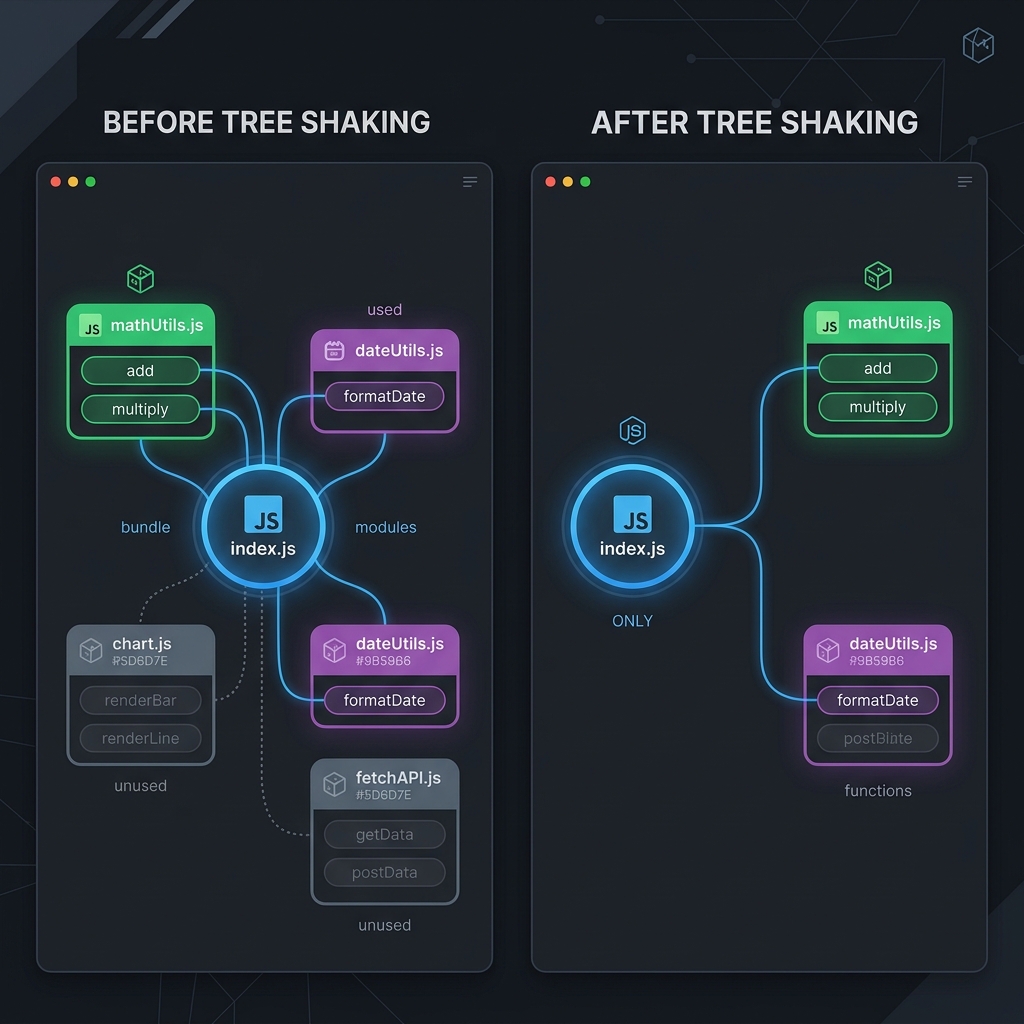
- Advantages:
- It reduces the bundle size by eleminating unused modules and functions.
- Faster load time.
- Performance will be improved.
- Cleaner and maintainable codebases.
58. What is prototype inheritance in javascript ?
- Prototype inheritance in javascript is the linking of prototypes of a parent object to a child object so that we can share and utilize the properties of a parent class using a child class.
- The ES5 introduced two differnd methods such as Object.create() and Object.getPrototypeOf().
let package = {
  version: "2.0",
};
let application = Object.create(package, {
  name: { value: "game" },
}); // inherited from package
console.log(application);
console.log(Object.getPrototypeOf(application));
Ref: https://www.scaler.com/topics/javascript/prototype-inheritance-in-javascript/
59. What are the differences between fetch and axios ?
- fetch is inbuilt webapi method present in most of the modern browsers where as axios is a third party library is built on top of XMLHttpRequest object.
- axios performs automatic parsing of response data where as in fetch we need to manually parse the response data(eg: response.json()).
- axios supports interceptors by using which we can modify the request or response before they are sent/received from the server.
- axios prevents csrf (cross site request forgery)attacks.
ref: https://apidog.com/blog/axios-vs-fetch/
fetch:
fetch(url)
  .then(response => {
    if (!response.ok) {
      throw new Error('Network response was not ok ' + response.statusText);
    }
    return response.json();
  })
  .then(data => {
    console.log(data);
  })
  .catch(error => {
    console.error('There has been a problem with your fetch operation:', error);
  });
axios:
axios.get(url)
  .then(response => {
    console.log(response.data);
  })
  .catch(error => {
    console.error('There has been a problem with your axios operation:', error);
  });
60. What are DRY, KISS, YAGNI, SOLID Principles ? (rarely asked)
-
DRY: Do not repeat yourself.
- Avoid duplicates. This make software more maintainable and less error-prone.
-
KISS: Keep it simple stupid.
- Keep the software design and implementation as simple as possible. This make software more testable, understandable and maintainable.
-
YAGNI: You are not going to need it.
- Avoid adding unnecessary features/functionalities to the software. This makes software focussed on essential requirements and makes it more maintainable.
-
SOLID:
- S - Single responsibility: means each class should have one job or responsibility.
- O - Open/Closed principle: Classes must be open for extension and closed to modification. This way we can stop ourselves from modifying the existing code and causing potential bugs.
- L - Liskov Substitution: If class A is subtype of class B then classB should be able to replace classA with out disrupting the behaviour of our program.
- I - Interface segregation: Larger interfaces must be split into smaller ones.
- D - Dependency inversion: High level modules should not depend on low level modules. Both should depend on abstraction.
61. What is Babel ?
- Babel is a javascript compiler which is used to convert the modern javascript code into the version that is understandable by all the modern and older browsers.
62. What are the main advantages of arrow functions ?
- Arrow functions allow us to write shorter and concise syntax and reduces the size of code.
- It increases the readability of the code.
const square = x => x * x;
- Arrow functions will solve the common pain points of this binding in traditional functional expressions. Arrow functions does not have their own this. It will take the this value from the parent's scope (i.e., code that contains the arrow function). For example, look at the setTimeout function below.
// ES5
var obj = {
  id: 42,
  counter: function counter() {
    setTimeout(function() {
      console.log(this.id);
    }.bind(this), 1000);
  }
};
obj.counter(); // 42

// ES6
var obj = {
  id: 42,
  counter: function counter() {
    setTimeout(() => {
      console.log(this.id);
    }, 1000);
  }
};
obj.counter(); // 42
ES6 arrow functions can't be bound to a this keyword, so it will lexically go up a scope, and use the value of this in the scope in which it was defined.
Helpful for understanding this binding for arrow functions:
In this link check No binding of this section :
https://www.freecodecamp.org/news/when-and-why-you-should-use-es6-arrow-functions-and-when-you-shouldnt-3d851d7f0b26/
https://stackoverflow.com/questions/22939130/when-should-i-use-arrow-functions-in-ecmascript-6
https://tc39wiki.calculist.org/es6/arrow-functions/
63. What is clearInterval in javascript ?
- This method takes the interval ID returned by setInterval as an argument and stops the corresponding interval from executing further.
let count = 0;
const intervalId = setInterval(() => {
  console.log(count++);
  if (count > 5) {
    clearInterval(intervalId); // Stop the interval after 5
  }
}, 1000); // Execute every 1 second
This code will print the numbers 0 to 5 with a one-second delay between each number. After printing 5, the clearInterval method will be called, and the interval will stop.
64. What are webworkers and give an example ?
- Webworkers allows us to run the jsvsacript code in the background with out blocking the main thread of the web application.
- This is mainly useful for performing computationally intensive tasks which will make the webapplication unresponsive.
- Eg: Larger attachment upload of 2gb.
Create a Web Worker Script :
// worker.js

// This code runs in the worker context
self.onmessage = function(event) {
  // event.data contains the data sent from the main thread
  let result = 0;
  for (let i = 0; i < event.data; i++) {
    result += i;
  }
  // Send the result back to the main thread
  self.postMessage(result);
};
Create the Main Script :
// main.js

// Check if the browser supports Web Workers
if (window.Worker) {
  // Create a new Web Worker
  const myWorker = new Worker('worker.js');

  // Send data to the worker
  myWorker.postMessage(1000000); // Example data

  // Listen for messages from the worker
  myWorker.onmessage = function(event) {
    // event.data contains the data sent from the worker
    console.log('Result:', event.data);
  };

  // Handle errors from the worker
  myWorker.onerror = function(event) {
    console.error('Error:', event.message);
  };
} else {
  console.log('Web Workers are not supported in this browser');
}
65. What are the differences between ^ and ~ symbol in package.json ?
-
Caret (^)
The caret ( ^ ) allows updates to the most recent minor version (1.x.x), but it will not allow changes that could potentially introduce breaking changes (major version updates).- Example: "^1.2.3"
- This means that the package manager will install any version from 1.2.3 to less than 2.0.0.
- It will install newer patch versions (e.g., 1.2.4, 1.2.6) and minor versions (e.g., 1.3.0, 1.4.0), but not major versions (e.g., 2.0.0).
-
Tilde (~)
The tilde ( ~ ) allows updates to the most recent patch version (x.x.1), but it will not allow updates to the minor or major versions.- Example: "~1.2.3"
- This means that the package manager will install any version from 1.2.3 to less than 1.3.0.
- It will install newer patch versions (e.g., 1.2.4, 1.2.5), but not new minor versions (e.g., 1.3.0).
66. Plain javascript basic questions:
- Write code to change style of div ?
let element = document.getElementById("newele");
element.style.color = "red";
element.style.backgroundColor = "blue";
element.style.fontSize = "20px";

// or

let elem = document.getElementById("newele");
elem.setAttribute("style", "color:white;background-color: brown;");
- Write code to add class to div ?
// Select the div element
var element = document.getElementById("myDiv");

// Add a class
element.classList.add("newClass");
67. Is javascript synchronous or asynchronous and single threaded or multithreaded ?
-
Javascript is a synchronous single threaded language.
- Single-threaded: It has one call stack and can do one thing at a time.
- Synchronous: It executes code line by line in order and each line must finish executing before the next line starts.
-
However, javascript can handle asynchronous operations using mechanisms like callbacks, promises and async/await. These mechanisms allow javascript to perform tasks such as network requests, file reading, setTimeout/setInterval without blocking the main thread.
-
These mechanisms allow JavaScript to delegate tasks to the browser and then continue executing other code while waiting for those tasks to complete. This asynchronous behavior gives the illusion of concurrency, even though JavaScript itself remains single-threaded.